Internal Linking Strategy
The reverse silo
 By Mark Cantrell, Founder & CEO, Upward Bound MediaLast updated
Short answer
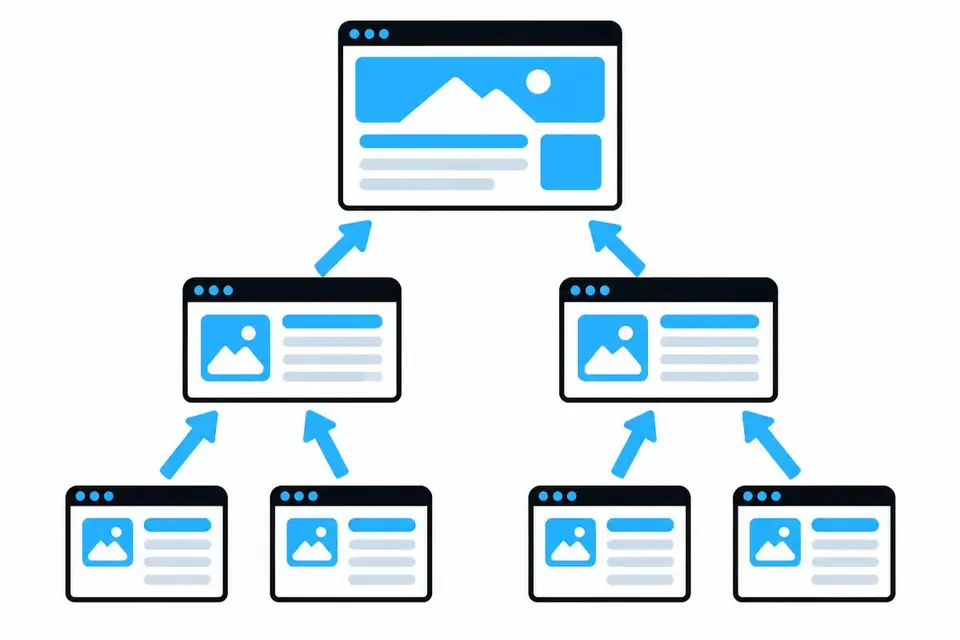
Service pages link up to their category services hub. Hubs link up to the homepage. Related services in the same hub link to each other, so no page sits alone.
On this page
What a reverse silo website is
Internal links connect pages on the same site. Standard silos pass authority from homepage to category hub to service. Reverse silos add links back up.
Do this
- Link [Service 1] up to the [Category] hub
- Link [Service 1] to [Service 2] in the same silo
Not this
- Service pages with no link back up
- Ten disconnected pages
Service pages link up to their hub
Link each service to its category services hub, such as [Service 1] to [Category].
Hubs link up to the homepage
Link every category services hub to the homepage so no page is isolated.
Lateral links between related pages
Link related services within the silos, such as [Service 1] to [Service 2] in [Category].
Links on the homepage
- Below the first screen, add a section per category that addresses the customer's need and links to its hub.
- Each hub links to its services. One linked silo is stronger than ten disconnected pages. Three reverse-linked silos send a signal generic sites can't copy.
- Choose searches with Keyword Targeting. See a full example.